
Healthcare’s Digital Evolution
Technology-driven trends are reshaping patient care, clinical efficiency, and the future of global health systems.

The Shifts Transforming Modern Healthcare
Healthcare continues to evolve rapidly as providers adopt digital systems, enhance patient experiences, and meet regulatory demands.
Key Trends Influencing Healthcare Technology

Integrated Digital Patient Experiences
Modern healthcare is moving toward seamless, connected patient journeys across apps, portals, telehealth, and in-hospital systems.

AI & Intelligent Healthcare Automation
Clinical workflows, diagnostics support, and administrative tasks are increasingly integrating AI. Secure and compliant AI will shape the next era of healthcare delivery.

Cloud-Driven Healthcare Modernization
Hospitals are adopting cloud infrastructure for faster operations, storage, and interoperable data exchange.

Expansion of Virtual & Remote Care
Remote monitoring has become foundational rather than optional. Hybrid care models will drive future patient engagement and reduce clinical load.

Compliance-Led Digital Transformation
Rising cyber threats and strict regulations make compliance with HIPAA, GDPR, ISO 27001, and regional data laws essential for modern healthcare platforms
Healthcare Compliance as a Digital Advantage
Healthcare innovation must progress alongside security and compliance to ensure trust, safety, and long-term operational reliability.
HIPAA-Aligned Architectures
Build systems that adhere to HIPAA security, privacy, and integrity requirements.
GDPR-Ready Data Handling
Ensure compliant data collection, storage, processing, and user protection.
Audit-Friendly System Design
Enable transparency and simplified auditing across healthcare workflows.
Secure EHR/EMR Integrations
Connect systems with compliant, secure, and scalable health data exchange.
Multi-Layer Data Protection
Protect sensitive health information with encryption, IAM, and governance.
Regulatory-Ready Cloud Environments
Deploy cloud solutions designed for industry-specific compliance needs.
Insights & Strategic Perspectives
This section highlights high-level insights that reflect Softuvo’s research-driven understanding of digital evolution in healthcare.
What Are the Top Features to Look for in Low-Code Development Platforms?
A practical guide for IT leaders, product managers, and teams ready to move fast without cutting corners.
You've probably heard the pitch: low-code development platforms let your team build applications faster, cheaper, and without a full engineering squad, and to a meaningful extent, it's true. But here's the part the pitch decks leave out: the wrong platform can quietly cost you more than it saves.
Vendor lock-in. Integration headaches. Security gaps that only appear at scale. A tool that felt perfect for a 3-person team, grinding to a halt when 300 people use it.
This guide cuts through the noise. It's written for the people who actually have to live with the platform they choose: IT leaders, product managers, and operations teams who want speed without regret.
First, Let's Be Honest About What Low-Code Is
Low-code platforms provide a visual development environment, drag-and-drop interfaces, pre-built components, and workflow builders that dramatically reduce the amount of hand-written code required to build an application.
They're not magic, and they're not a replacement for engineering. They're a multiplier. A skilled developer using a well-chosen low-code platform can ship what would otherwise take a full team. A non-technical business analyst can automate a process that previously required a developer ticket queue.
The question isn't whether low-code works. It demonstrably does. The question is, which platform works for your specific situation, and what does it cost you when it doesn't?
Top Features That Actually Matter
These aren't arbitrary checkboxes. These are the features of low-code development tools that directly impact long-term success.
1. A Visual Interface That Doesn't Lie
Every platform claims to be intuitive. Most aren't, or they're intuitive for simple things and brutal for anything complex.
What to actually test: Can a business analyst build a multi-step approval workflow without calling IT? Can a developer quickly drop into code when the drag-and-drop runs out of runway? Can both users work in the same environment without stepping on each other?
If the demo only shows simple forms being built, ask to see something messy. That's where the truth is.
2. Pre-Built Components That Don't Require Reinvention
Good platforms come with a component library that covers 80% of things every business application needs: forms, dashboards, data tables, notifications, user authentication, and approval flows.
The trap here is component quality, not just quantity. A library of 200 brittle components is worse than 40 solid, well-documented ones. Ask: How well are these maintained? How do they behave on mobile? Can they be styled to match our brand without forking the component entirely?
3. Integration Capabilities That Go Beyond the Basics
Here's where a lot of platforms quietly fall apart in real enterprise environments. Most can connect to Salesforce or Google Sheets. Far fewer can cleanly connect to a legacy ERP, an on-premise database, or a custom internal API with non-standard authentication.
What you need to verify before committing:
• REST and SOAP API support with configurable authentication (OAuth2, API key, JWT)
• Native connectors for your specific CRM, ERP, or cloud infrastructure
• Webhook support for event-driven workflows
• The ability to write custom integration logic when pre-built connectors fall short
A platform that can't talk to your existing systems isn't a time-saver; it's an island, and that’s where strong platform integration services are essential.
4. Customization That Doesn't Hit a Wall
Every low-code platform has a ceiling. The question is where that ceiling is, and what happens when you reach it.
The best platforms allow developers to inject custom code, JavaScript, Python, and SQL at specific points in the application logic. This matters because your requirements will eventually exceed what the platform anticipated. If the answer to every edge case is "that's not supported," you'll end up building a workaround on top of a workaround until the app becomes unmaintainable.
5. Workflow Automation That Actually Automates
Workflow automation is one of the most commonly overclaimed features in this space. Many workflow automation tools offer basic linear flows. What most mid-sized and enterprise teams actually need is considerably more complex.
Meaningful automation support looks like:
• Conditional branching and parallel processing
• Time-based triggers and scheduled jobs
• Error handling with retry logic and fallback paths
• Human-in-the-loop steps for approvals and exceptions
• Audit trails that are actually readable
If a platform's automation is limited to "if this, then that" chains, it will force your team to build complexity manually, which defeats the purpose.
6. Security and Governance Built In, Not Bolted On
This is the feature most often evaluated last and regretted first.
Security features to verify before signing anything:
• Role-based access control (RBAC) that's granular enough to actually use
• Data encryption at rest and in transit
• SSO and MFA support
• Audit logs that meet your compliance requirements (SOC 2, GDPR, HIPAA, etc.)
• Clear data residency controls if you operate across regions
A note on governance: it's not just about security. It's about who can deploy what, where, and with what approval process. Platforms with strong governance features let IT maintain oversight without becoming a bottleneck.
7. Scalability That Holds Up Under Pressure
A pilot that runs beautifully for 20 internal users will reveal a platform's weaknesses when 2,000 customers start using it. Or when your data volume triples. Or when you add three more integrations.
Questions to ask (and test) about scalability:
• What are the platform's performance benchmarks under load?
• How does the pricing scale of the model punish success?
• Can you run the platform in your own cloud infrastructure if needed?
• How is multi-tenancy handled if you're building customer-facing apps?
Don't take the vendor's word for this. Stress test your pilot. Build something that represents your real use case and push it.
8. Collaboration and Version Control
Software development without version control is archaeology. You dig through the rubble of previous decisions, trying to figure out what changed and why.
At a minimum, a production-ready platform should offer:
• Git-based or equivalent version control for application logic
• Environment management (development, staging, production)
• Role separation between builders, reviewers, and deployers
• Change history that's auditable and reversible
Collaboration features matter too, not just for developers but for business users contributing to the design of a process or workflow. Real-time editing, commenting, and review cycles should be as natural as they are in a Google Doc.
How to Actually Choose: A Practical Framework
Once you've verified the features above, the decision usually comes down to five questions:
What are you actually building, and for whom?
An internal operations tool for 15 employees has completely different requirements than a customer-facing application for 50,000 users. Be specific about this before you evaluate anything. Platforms optimized for internal tooling often struggle with consumer-scale deployment, and vice versa.
What does your team look like today?
A platform that requires significant developer involvement to build anything meaningful isn't low-code; it's just a different kind of code. Conversely, if your team includes technical developers, don't choose a platform so locked down that it frustrates them. Match the tool to the team, not the marketing materials.
What systems does it need to connect to?
Map your integration requirements before you evaluate platforms. List every system, CRM, ERP, database, cloud services, and communication tool, and verify connection support for each. This will immediately eliminate most of the wrong choices.
What does the total cost look like at scale?
Low-code platforms for startups are notorious for starter pricing that looks reasonable and growth pricing that doesn't. Common cost gotchas include per-user fees that compound quickly, premium pricing for advanced security features, charges per workflow run or API call, and high cost jumps at the enterprise tier.
Model your expected usage at 2x and 5x the current scale. If the numbers become uncomfortable, keep looking.
Can you validate it on a real use case?
Never choose a platform based on a vendor demo. Run a pilot. Build something that represents your actual complexity, not a sample app, not a tutorial. If the platform handles your real requirements cleanly, that's meaningful evidence. If it breaks down, you've saved yourself a painful migration later.
What's Changing in 2026
The low-code market is evolving quickly. Three shifts are worth paying attention to when evaluating platforms now:
AI-Assisted Development Is Becoming Standard
The better platforms now incorporate AI to generate workflow logic from natural language descriptions, suggest optimizations, flag potential errors, and write boilerplate code. This isn't gimmicky; when it works well, it meaningfully accelerates development for both technical and non-technical users. Evaluate how mature a platform's AI features are and whether they add real speed or just generate demos.
Business Teams Are Taking Ownership
The gap between IT and business is narrowing. Operations, finance, and HR teams are increasingly building and maintaining their own tools, with IT setting guardrails rather than building everything from scratch. Platforms that enable this model (strong governance, user-friendly interfaces, low floor, and high ceiling) are gaining share for good reason.
Automation Is the Real ROI Driver
The platforms delivering the clearest business value are those where automation is a first-class citizen, not an afterthought. Organizations aren't just building apps; they're eliminating manual processes, reducing error rates, and reclaiming significant operational time. If a platform's automation capabilities are weak, the ROI case weakens with it.
The Bottom Line
Low-code platforms can genuinely transform how quickly your organization delivers software. But the gap between a good choice and a bad one is significant, and it rarely shows up in a demo.
The platforms worth investing in share a few common traits: they're honest about their limitations, they scale without punishing you for success, they connect cleanly to your existing infrastructure, and they give your team the flexibility to build what you actually need, not just what the platform anticipated.
Evaluate carefully. Pilot thoroughly. And don't sign anything before you've stress-tested it against your real requirements.
The right low-code platform isn't the one with the best demo. It's the one that's still working well and still under budget eighteen months after you've deployed it.
How Software Development Companies Build Custom Business Solutions That Solve Real Business Challenges
There comes a time in the life of every growing business when things stop going as smoothly as they used to.
What used to work well slowly becomes a problem with operations. Teams now spend more time managing processes, which slows down decision-making and breaks up data.
And the hardest part? Nothing seems "broken enough" to need fixing right away.
A lot of businesses are trying to solve complicated, changing problems with generic tools, but that doesn't work very well in today's digital world.
Reports from the industry say that businesses now use an average of 100 or more SaaS apps, but a lot of business data is still stuck in silos. This has a direct effect on productivity, decision-making, and growth.
This is why more and more forward-thinking companies are choosing to hire a software development company to make custom solutions that fit their business needs.
What Are Custom Business Solutions?
Custom business solutions are software systems designed specifically for a company’s workflows, goals, and operational challenges.
Unlike off-the-shelf tools built for broad use, custom software development focuses on aligning technology with a business's actual functions.
These solutions may include:
Workflow automation systems
CRM platforms tailored to business processes
Data analytics and reporting dashboards
AI-driven automation tools
and Custom web and mobile applications
Instead of forcing teams to adapt to software, these systems are built to adapt to the business.
Business Challenges Companies Are Facing in 2026

The way businesses work has changed in 2026. Some of the most important problems are:
Tool Overload Without Integration
Organizations rely on multiple platforms, but most operate in isolation, creating inefficiencies.Data Availability Without Clarity
While businesses collect more data than ever, turning that data into actionable insights remains a challenge.Scaling Complex Operations
Growth introduces layers of complexity that traditional systems struggle to handle.Unstructured AI Adoption
Many companies are investing in AI without a clear roadmap, leading to limited ROI.Increased Security and Compliance Requirements
Expanding digital systems brings higher risks and stricter regulatory expectations.
These are not short-term issues; they require structured, scalable business software solutions.
Why Businesses Need Custom Business Solutions
Standardized tools serve well in the early stages, but as operations grow, limitations begin to surface.
Businesses often experience:
Increasing reliance on manual workarounds
Duplicate and inconsistent data across systems
Delays in processes and decision-making
Low adoption of existing tools
At this stage, the problem is the misalignment between the tools and the business, and this is where custom software solutions create real value.
How a Software Development Company Builds Custom Solutions
A reliable software development company approaches development with a clear focus on business outcomes.
Understanding the business, not just the requirement: The process begins with analyzing workflows, identifying inefficiencies, and understanding the business requirements.
Translating challenges into structured systems: Business problems are mapped into practical solutions; for example, manual reporting becomes automated dashboards, and disconnected processes become unified systems.
Choosing the right technology stack: The focus remains on scalability, integration, and long-term maintainability.
Designing for usability: Solutions are built to be intuitive, ensuring teams can adopt them without friction.
Developing iteratively: A step-by-step approach allows continuous feedback, testing, and refinement.
Ensuring seamless integration: Systems are designed to work with existing tools like CRMs, ERPs, and analytics platforms.
Testing in real-world conditions: Performance, security, and usability are validated before deployment.
Continuous improvement: Post-launch, the system evolves based on real usage and business needs.
Measuring business impact: Success is defined by outcomes, time saved, cost reduced, productivity improved, and customer experience enhanced.
Softuvo follows this approach to ensure that custom software development delivers measurable business value, not just functional software.
Best Custom Solutions
Modern organizations invest in a range of business software solutions, including:
Enterprise Resource Planning (ERP) systems
Customer Relationship Management (CRM) platforms
Data analytics and business intelligence solutions
AI-powered automation systems
Custom web and mobile applications
Workflow and process automation tools
Each solution is designed to solve specific operational challenges, rather than applying a one-size-fits-all approach.
How These Solutions Solve Real-World Challenges
Custom solutions improve operations by directly addressing common business inefficiencies:
Manual reporting is replaced with automated dashboards, enabling faster and more accurate insights
Disconnected tools are unified into integrated systems, ensuring consistent data flow
Delayed decision-making is improved through real-time analytics, allowing quicker, data-driven actions
Repetitive tasks are automated, reducing manual effort and operational errors
Customer data is centralized through CRM systems, improving visibility and engagement
Benefits of Custom Business Solutions
Investing in custom software solutions offers long-term advantages:
Improved operational efficiency
Faster and more accurate decision-making
Scalability aligned with business growth
Reduced dependency on multiple disconnected tools
Enhanced user experience and adoption
Stronger competitive positioning
While the initial investment may be higher, the long-term return in efficiency and control makes it a strategic decision.
Custom Software vs Off-the-Shelf Tools: What’s Right for Your Business?
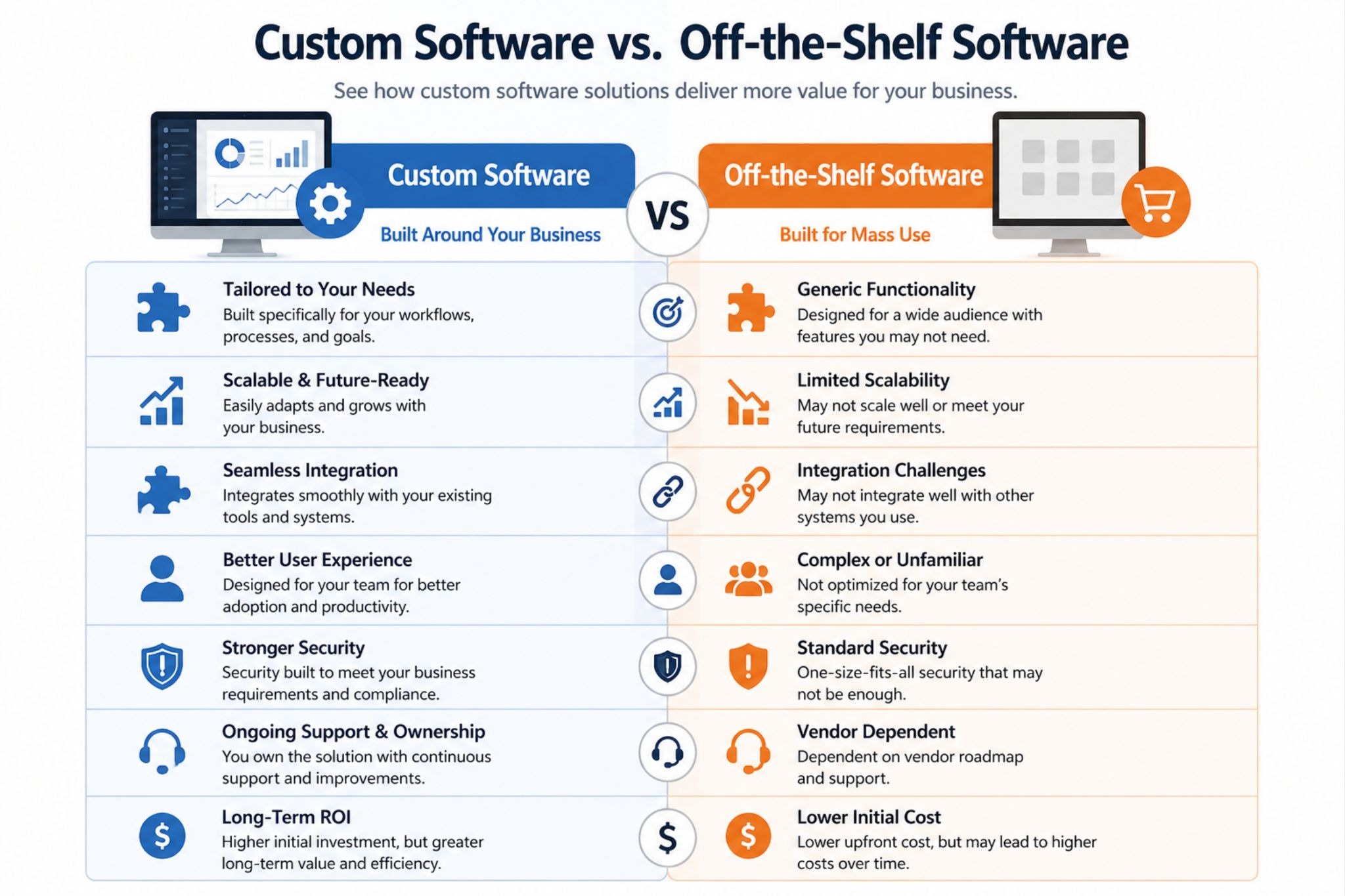
Businesses often face a key decision: whether to use off-the-shelf software or invest in custom development.
Off-the-shelf solutions:
Faster to implement
Lower upfront cost
Limited flexibility
Custom software solutions:
Related to business needs
Scalable and adaptable
More efficient in the long run
Final Thoughts
Not the businesses that use the most tools, but the ones that use the right systems made for their needs are the ones that do well today.
Choosing to hire a software development company is not just a technical decision, but it’s a strategic one. It’s about building solutions that align with how your business operates today and how it will evolve tomorrow.
Because at the end of the day, software is more than just what it can do. It's about making systems that make things clear, work better, and help businesses grow in a way that lasts.
Read MoreFrom Idea to App Launch: How to Hire App Developers in Canada
Building an app often begins with excitement, a fresh idea, and a clear vision, but once development starts, reality sets in. Timelines stretch, costs increase, and sometimes the final product doesn’t match the expectations.
This is a more common problem than people think, and in most cases, the problem is hiring the wrong development team.
You need to be careful when hire app developers in Canada. Making the right choices in the beginning can save you time and money without adding any extra stress.
Why Hiring the Right Developers Matters
Today, a mobile app is more than just a digital product. It becomes the core of a business, shaping how users interact, engage, and decide whether to stay or leave.
When development is done right, an app feels smooth, intuitive, and reliable. But when it’s rushed or handled by the wrong team, even a strong idea can fail.
A poorly built app can:
Drive users away
Damage your brand
Lead to expensive rework
In Canada, full-scale app development projects typically range from $30,000 to $100,000+, depending on complexity and expertise. That’s a significant investment, which makes choosing the right team even more important.
Here’s a step-by-step approach to selecting the right developers for your project.
Step 1: Define Your App Idea Clearly

Before reaching out for custom app development in Canada, take a step back and clearly define your idea. You don’t need technical expertise, but you do need direction.
Think about:
The problem your app solves
Who is your target audience
What should your first version include
A simple and well-defined idea is always better than a complicated one, because developers can enhance your concept, but they can’t fix confusion.
Step 2: Choose the Right Hiring Model
When you begin your search to hire app developers in Canada, you’ll come across different hiring options. Each works best in different situations.
Freelancers
Freelancers are a good fit for small tasks or early-stage ideas. They are flexible and often more affordable, but may lack long-term support.
Agencies (Most Common for Startups)
Agencies provide a complete team, including designers, developers, and testers. This makes the process more structured and efficient. Many founders prefer agencies for Canada startup app development because they offer reliability and faster execution.
In-House Developers
Building an in-house team gives you full control, but it also comes with higher costs and long-term commitments.
In recent years, many businesses have been choosing to outsource app developers. This approach provides access to skilled professionals without the overhead of hiring full-time staff.
Step 3: How to Evaluate App Developers
Not all developers are the same; some focus only on coding, while others think about the overall product experience.
Check The Real Portfolio
Don’t rely on screenshots alone; look for live applications, user reviews, and real performance. If you’re hiring iOS app developers in Canada, check their apps directly on the App Store.
Ask About Their Approach
Instead of just asking whether they can build your app, try to understand how they would approach it, as strong developers will ask questions, suggest improvements, and highlight potential challenges.
Test Communication
Communication is an important part because if things feel unclear at the beginning, they usually become more complicated later.
Red Flags to Avoid
Extremely low pricing
No structured development process
Lack of similar past projects
Poor or slow communication
These signs often lead to delays, misunderstandings, and unsatisfactory results.
Step 4: Understand the Cost of Hiring Developers in Canada
In Canada, development rates generally range between $70 and $140 CAD per hour, depending on experience and location. A basic app might cost around $30,000, while more advanced platforms can exceed $100,000.
These figures highlight an important reality that quality development requires proper investment.
This is also why software development outsourcing in Canada has become more common. Many businesses now combine local expertise with global talent to manage costs effectively.
Globally, rates can vary from $20/hour to $120+/hour depending on region and skill level.
What Affects Cost?
App complexity
Features (AI, real-time functionality, payments)
Design quality
Technology stack
Development timeline
The lowest price may seem attractive, but it rarely delivers long-term value.
Step 5: Consider Software Development Outsourcing
In 2026, software development outsourcing is a strategic decision. Instead of building large internal teams, many businesses now work with external developers who bring specialized expertise.
This enables companies to scale faster, adapt quickly, and focus on business growth.
Outsourcing offers:
Access to global talent
Faster development cycles
Reduced operational costs
With the global outsourcing market continuing to grow, more startups are choosing to outsource app developers as a practical and efficient solution.
Step 6: Start With an MVP (Minimum Viable Product)
A smarter approach is to begin with an MVP, a simplified version of your app that includes only the core features.
Launching early allows you to gather real user feedback and improve based on actual needs. Many successful apps started small and evolved.
Why MVP Works
Reduces initial cost
Speeds up launch
Helps validate your idea
Step 7: Set Clear Contracts and Workflow
Clearly defined timelines, milestones, and deliverables to prevent confusion. Regular communication ensures everyone stays aligned throughout the process.
Using simple tools for project tracking and updates can make collaboration smoother and consistent.
Step 8: Plan for Launch
Launching your app is an important milestone, but it’s not the end of the journey.
After release, your app will require ongoing updates, improvements, and maintenance. User feedback and performance tracking play a major role in long-term success.
Post-Launch Essentials
Testing (QA)
App Store submission
Bug fixes
Regular updates
A Simple Hiring Checklist
Before making your final decision, take a moment to review a few key points:
Your app idea is clearly defined
Your budget is planned
You’ve reviewed real developer work
Communication is clear and comfortable
Project scope and expectations are documented
These small steps can help avoid major issues later.
FAQs
How long does it take to make an app?
The timeline changes based on how hard the app is to make. It can take 2 to 4 months for a simple app and 4 to 8 months for a mid-level app. More complicated apps could take eight months or more.
What is the best choice for new businesses?
For most new businesses, the best thing to do is hire an agency or outsource app developers. It lowers costs up front and gives you access to teams with a lot of experience.
What do I need to look at before hiring developers?
It's important to look over their portfolio, figure out how they communicate, and judge how they develop. Real project experience and feedback from clients are good signs that someone is reliable.
What does custom app development in Canada include?
When you hire someone to make a custom app in Canada, they will usually plan it, design it, build it, test it, launch it, and then help you with it after it goes live. It makes sure that the app is made just for your business needs.
Do I need to know a lot about technology to hire app developers?
No, you don't need a technical background. A good development team will walk you through the process and break down technical details into simple terms.
What are common mistakes to avoid when hiring developers?
Common mistakes include choosing based only on cost, not verifying portfolios, having unclear requirements, and ignoring communication quality.
Final Thoughts

Hiring the right developers is the foundation of your app’s success. Whether you’re looking to outsource app developers or building your first product, the choices you make early on will shape your results.
Take your time, ask the right questions, and focus on long-term value, because a successful app isn’t just built; it’s built the right way.
Read MoreHow AI Is Transforming Supply Chain Optimization
Supply chain optimization is changing fast, and here’s what AI is actually doing. Imagine:
A delayed shipment.
An out-of-stock product.
A warehouse full of items no one is buying.
These problems are everyday realities in supply chain management, and the truth is that most of them don’t happen because companies lack tools. They happen because decisions are made too late.
AI is now transforming entire supply chain management. Today, supply chain optimization is about making the right decisions before problems even show up.
How Supply Chains Got Here

To understand the transformation, we must examine how supply chains have evolved.
The Era of Deterministic Planning (Pre-2000)
Early supply chains relied heavily on ERP systems and fixed rules. These systems operated on historical data and predefined logic, assuming that future patterns would resemble the past.
This worked in stable times, but failed when anything unexpected happened.
The Optimization Era (2000–2015)
As computational capabilities improved, companies began adopting mathematical optimization techniques such as linear programming and heuristics.
The goal shifted toward minimizing costs across transportation, warehousing, and inventory. However, these systems still depended on structured data and could not adapt dynamically to uncertainty.
The Machine Learning Layer (2015–2020)
The introduction of machine learning marked a turning point. Systems began learning from data instead of just following rules. Forecasting improved, and risks could be spotted earlier.
Yet, decision-making still required human intervention in most cases.
What’s Changing Now (2020–Present)
The disruptions caused by the COVID-19 pandemic exposed the limitations of traditional systems and accelerated the adoption of AI.
Modern supply chains are now evolving into autonomous, self-correcting systems that can:
Predict disruptions before they occur
Continuously re-optimize decisions in real time
Recommend or execute actions without human delay
What was once a linear pipeline has become a living, adaptive network.
How AI Works in Supply Chains

Modern supply chain management is powered by a layered architecture that integrates data, intelligence, and execution.
Data Layer: The Foundation
AI systems rely on massive volumes of data from multiple sources:
Enterprise systems (orders, invoices, inventory)
IoT sensors (location, temperature, movement)
External signals (weather, economic trends, geopolitical events)
Without high-quality data, even the most advanced AI models fail.
Prediction Layer: Turning Data into Insight
Machine learning models process this data to generate predictions such as:
Demand forecasts based on real-time signals
Estimated delivery times with probability of delays
Supplier risk scores
This layer transforms uncertainty into measurable probabilities.
Optimization Layer: Where Decisions Are Made
Predictions alone are not enough. AI combines them with constraints, cost, capacity, and service levels to determine the best possible actions.
Technologies like reinforcement learning and advanced optimization algorithms are used to:
Allocate inventory across networks
Optimize transportation routes
Balance trade-offs between cost and speed
Execution Layer: From Insight to Action
Decisions are implemented through operational systems such as:
Warehouse management systems
Transportation platforms
Procurement tools
In advanced setups, execution can happen automatically, reducing response time significantly.
Feedback Loop: The Self-Improving Engine
Perhaps the most powerful aspect of AI-driven supply chains is the feedback loop.
Systems continuously learn from outcomes, what worked, and what failed, and refine future decisions. This creates a cycle of continuous improvement that traditional systems could never achieve.
Real-World Impact

The true value of AI becomes clear when we look at how leading companies are using it in practice.
Amazon: Anticipatory Logistics
Amazon has explored predictive shipping models that analyze customer behavior to anticipate purchases before they are made.
By positioning products closer to expected demand, the company reduces delivery times and enhances customer experience.
Zara: Real-Time Production Cycles
Unlike traditional fashion brands that rely on seasonal collections, Zara uses real-time sales and customer feedback to adjust production continuously.
This allows the company to respond to trends within days, not months, significantly reducing unsold inventory.
UPS: Route Optimization at Scale
UPS developed the ORION system, which uses advanced algorithms to optimize delivery routes.
Even small improvements in routing translate into massive savings, reducing millions of miles traveled and cutting fuel consumption significantly.
Tesla: Supply Chain Meets Software Engineering
Tesla has taken a unique approach by integrating supply chain decisions with product engineering.
During semiconductor shortages, the company adapted by rewriting software to support alternative chips, demonstrating how deeply supply chains are now intertwined with technology.
Advanced Concepts Driving the Future
Beyond current implementations, several advanced concepts are shaping the next generation of supply chain management.
Digital Twins
A digital twin is a virtual replica of the entire supply chain, allowing companies to simulate disruptions, test strategies, and evaluate outcomes before implementing changes in the real world.
Reinforcement Learning
Unlike traditional models, reinforcement learning systems improve through trial and error, making them highly effective for dynamic environments like logistics and warehouse operations.
Multi-Echelon Inventory Optimization
This approach optimizes inventory across all levels of the supply chain, from central warehouses to local stores, ensuring efficiency across the entire network rather than isolated nodes.
Control Towers
AI-powered control towers act as centralized command centers, providing real-time visibility, predictive insights, and automated decision-making capabilities.
The Bigger Shift: Decision Intelligence as a Competitive Advantage
The companies leading today are not necessarily those with the largest networks but those with the most intelligent systems: systems that can predict, adapt, and act faster than competitors.
Future of Supply Chain
As AI continues to evolve, supply chains will become:
More autonomous, with minimal human intervention
More personalized, enabling mass customization
More sustainable, optimizing for environmental impact alongside cost
At the same time, the boundary between supply chain management and software engineering will continue to blur.
How Softuvo Helps Businesses Improve Supply Chain Optimization
Softuvo works as a reliable software development company to improve supply chain optimization by building custom solutions that match their exact needs. Instead of using generic tools, businesses get systems designed around their processes, data, and goals. At Softuvo, we:
Build custom systems
Use AI for better decision-making
Help companies scale their operations
Final Thoughts
AI is not merely an upgrade to existing supply chains; it is a redefinition of how they function. From rigid, rule-based systems to adaptive, self-learning networks, the shift is profound.
And at its core lies a simple truth: The future of the supply chain belongs to those who can turn data into decisions and decisions into action faster than anyone else.
Read More
Explore Our Healthcare Solutions
For organizations looking to transform care delivery, Softuvo builds modern healthcare systems, secure cloud architectures, scalable platforms, and compliance-first engineering.
View Healthcare Solutions